Event
|
criticalsection
|
mutex
|
semaphore
|
- Notify a thread when to perform its task.
- Indicate that an event has occurred.
- Threads in other processes can open a handle to an existing event object by specifying its name in a call to CreateEvent.
|
- When multiple threads have shared access to the same data, the threads can - interfere with one another.
- critical section is limited to only one process or DLL and cannot be shared with other processes
|
- synchronization object whose state is set to signaled when it is not owned by a thread and nonsignaled when it is
- Only one thread at a time can own a mutex object.
- Threads in other processes can open a handle to an existing mutex object by specifying the object name in a call to CreateMutex.
|
object's state is set to signaled when its count is greater than zero, and nonsignaled when its count is zero
- application uses a semaphore to limit the number of threads using a resource
- can be used across processes or within a single process
|
- To signal an event, use the SetEvent or PulseEvent function. SetEvent does not automatically reset the event object to a nonsignaled state. PulseEvent signals the event, and then resets the event.
|
- If another thread calls EnterCriticalSection and references the same critical section object, it is blocked until the first thread calls the LeaveCriticalSection function.
- create a handle to the critical section object by calling the InitializeCriticalSection function.
|
- A thread calls the CreateMutex function to create a mutex object.
- owning thread releases the mutex object by calling the ReleaseMutex function
|
CreateSemaphore function to create a named or unnamed semaphore object.
- thread calls ReleaseSemaphore to increase the semaphore count by one
|
Wednesday, December 3, 2014
Event vs Critical Section vs Mutex vs Semaphore [WinCE]


VirtualAlloc | HeapAlloc | malloc | new [WinCE]
VirtualAlloc
|
HeapAlloc
|
malloc
|
new
|
A low-level, Windows API that provides lots of options, but is mainly useful for people in fairly specific situations. Can only allocate memory in (edit: not 4KB) larger chunks. There are situations where you need it, but you'll know when you're in one of these situations. One of the most common is if you have to share memory directly with another process. Don't use it for general-purpose memory allocation. Use VirtualFree to deallocate.
|
Allocates whatever size of - memory you ask for, not in big chunks than VirtualAlloc. HeapAllocknows when it needs to call VirtualAlloc and does so for you automatically. Like malloc, but is Windows-only, and provides a couple more options. Suitable for allocating general chunks of memory. Some Windows APIs may require that you use this to allocate memory that you pass to them, or use its companion HeapFree to free memory that they return to you.
|
The C way of allocating memory. Prefer this if you are writing in C rather than C++, and you want your code to work on e.g. Unix computers too, or someone specifically says that you need to use it. Doesn't initialise the memory. Suitable for allocating general chunks of memory, like HeapAlloc. A simple API. Use free to deallocate. Visual C++'s malloc calls HeapAlloc.
|
The C++ way of allocating memory. Prefer this if you are writing in C++. It puts an object or objects into the allocated memory, too. Use delete to deallocate. Visual studio's new calls HeapAlloc, and then maybe initialises the objects, depending on how you call it.
|
Audio driver [WinCE]
wave main
|
-- Interfaced with waveapi.dll
-- Initialise hardware context which includes configuring DMA irq, various variable initialisation, getting DMA memory, I2s registers/ IST initialization.
-- Handle various flag in the WAV_IOControl which handles
device capacity | number of devices | open stream for a device | start/stop running stream | get position | reset stream | add new buffer | increase or decrease volume |
| set playback rate |
|
Device context
|
- Open stream
-- Create stream context (simply create a object)
-- open the stream | include basic initialisation such as wave header head/tail/current/ set gain or volume | add new stream | call back open
- Get device capacity return all PCM format supported |
- Stream ready to render
-- called when playback is to happen or add to queue for recording.
- transfer buffer transfer buffers | rendering buffer.
|
-. Stream context
|
open the stream | include basic initialisation such as wave header head/tail/current/ set gain or volume | add new stream | call back open
|
Rendering a stream
|
The data comes from application is of various format. To have the data the require format, we have to process it and fill the buffer and then fill the buffer which will be finally send for play. It may include adding audio/volume gain in the stream. May be specific to format such as stereo 16 or mono or 8 bit or 16 bits.
|
output and input device
|
Keeps render definition specific to mono or stereo or 16 bit or 8 bit
|
midi stream
|
for tone generation
|
Developing USB Device Drivers [WinCE]
Developing USB Device Drivers
- communications protocol that supports serial data transfers between a host system and USB-capable peripherals.
- USB device drivers communicate with USB devices through logical communication channels called pipes.
- USB system software implements APIs that USB device drivers use to open and close pipes, configure them, read and write to them, and so on.
- Pipes are connected to endpoints on the USB device, which are logical producers or consumers of data.
- USB devices generally have several endpoints, each with a specific purpose.
- All USB devices have a special endpoint, endpoint number 0, which is used as a high-level control channel.
- Internally, the USB system software and hardware in Windows CE handles the task of marshalling the data from all pipes going to and from the endpoints on all USB devices connected to the Windows CE-based platform onto a single USB cable.
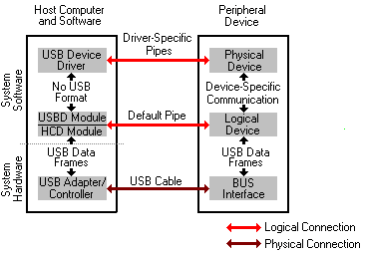
Structure of the USB implementation in Windows CE
- Windows CE supports the host side of the USB architecture, which enables developers to write USB device drivers for any USB peripheral devices.
- Windows CE provides limited support for the device side of the USB architecture, which allows a Windows CE-based platform to appear as a USB peripheral to other computers.
-host side exists to support the use of USB peripherals,
- device side exists mainly to facilitate USB connectivity to desktop computers.
- USB architecture implemented in Windows CE supports both device-specific USB drivers, and more generic USB drivers known as class drivers, which can control a whole class of similar devices.
- Microsoft supplies one sample USB driver: a class driver for human interface-class (HID class) devices.
- OEMs who wish to support USB on their Windows CE-based platforms must port Microsoft's sample HCD module implementations to their hardware.
- Microsoft supplies sample HCD modules for OHCI- and UHCI-compliant host controller chips.
- Writing USB device drivers is generally easy because the USB infrastructure itself provides a rich set of services for accessing USB peripheral devices.
- USB device drivers can use high-level data transfer functions to send data to and read data from USB peripherals,
- developer can concentrate on writing the code that exposes the USB device to applications
- Windows CE supports all four types of data transfer defined in the Universal Serial Bus Specification
- USB device drivers can use any of the transfer types that are appropriate for their peripherals.
- Windows CE 3.0 also provides some support for the device side of the USB device/host architecture.
- This allows Windows CE-based platforms to communicate to other USB hosts, such as desktop PCs, through a USB connection.
- Microsoft provides a sample USB function controller driver that works with the Scanlogic SL11 USB function controller chip.
- USB client drivers exist to make the services of peripheral devices available to applications.
- OEMs and IHVs can choose among the following three strategies to make the services of peripheral devices available to applications:
- Using the stream interface functions.
USB device drivers can expose the stream interface functions like any other device driver. Applications can then treat the peripheral device as a file and use standard file I/O functions to interact with the device.
- Using an existing Windows CE API.
USB device drivers can indirectly expose certain types of peripherals to applications by interacting with a Windows CE API if Windows CE has an existing API appropriate to the peripheral. For example, USB drivers for mass storage devices, such as hard drives and CD-ROM drives, can expose devices through the standard installable file system interface. The sample HID-class driver included in the DDK also uses this strategy. The driver does not expose devices directly to applications; rather, it interacts with existing Windows CE APIs in order to submit the correct input events to the system. Thus, the USB nature of HID-class devices is transparent to applications.
- Creating a native device driver.
This strategy does not place any restrictions on the way a USB driver exposes a device. It allows you to create whatever API best maps to the ways in which applications are likely to use your USB device. However, you must provide appropriate documentation for application writers who will be writing applications that use the driver because application writers cannot otherwise know what APIs your driver exposes.Friday, October 23, 2009
Subscribe to:
Posts (Atom)